


When Positive Grid released BIAS for iPad I, and to be honest I think anyone that tried it, was blown away. While I’m sure amp modelling software companies had tools like this internally to tweak their amp models, never before had the public had access to such an amazing piece of software to create and share your own creations. Not only does BIAS sound great it looks great too, that’s the beauty of the app it looks like you are really inside the amp tweaking settings and swapping tubes.
The only issue with having an app as iOS only is that it isn’t the most convenient when recording on your desktop computer, so much to the delight of guitarists all over the world and many bedroom and professional producers Positive Grid have created a plugin version of BIAS to use in your favourite DAW called BIAS Desktop.
I know my demonstration is fairly long but I wanted to run through BIAS Desktop’s various types of amp models and show how powerful the editing features are. I did include a demo track at the end which I think sounds amazing (the tones I mean). I plugged my Cilia CGA7 into my Focusrite Scarlett 2i4 which is connected to my iMac running Reaper. In the demonstration this is exactly the setup you are hearing. For the demo track I double tracked the rhythm guitars, added a lead track with slightly more gain dialed in, doubled the lead track toward the end of the solo and octave lower and added my Ibanez 5 string bass (also using a BIAS amp model) and finished it off with Superior Drummer.
Because I know some people won’t have the patience to watch my entire demo video here is the track I wrote and recorded using BIAS Desktop:
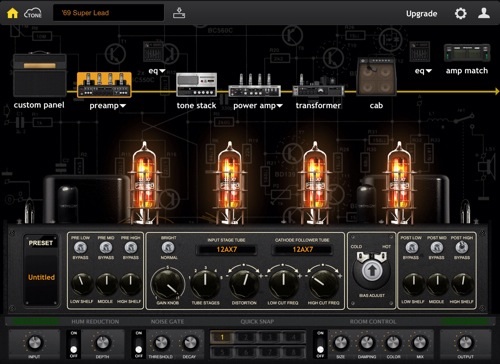
I can’t get enough of the Mark IIc+ model! I’d actually happily pay for BIAS if this was the only amp to edit, of course there area actually plenty of different amps to choose from to cover any situation and if a model doesn’t sound exactly like what you’re looking for you can change a myriad of settings, switch out the transformer, add an EQ after the preamp stage bias the power tubes, add or remove tube stages for more or less gain or switch the cab and mic placement. With the 36 models included you have every amp tone at your fingertips and to top it off you can download thousands of artist and user created and matched amp models from Positive Grid’s ToneCloud!
Now just one thing I feel I should point out, BIAS does not include effects such as overdrive pedals, chorus, flanger etc. which you get with some amp modelling software. BIAS concentrates on doing one thing really well. You will have to use your own effects plugins with your newly created amp creations. This is no big deal to me, I’d rather they concentrate on getting the amp models as close to the real thing personally.
One of the coolest new features of BIAS Desktop is the Amp Matching module which takes a sample of a real amp and makes internal changes to a ballpark model amp you have chosen to create a tone that is close as possible. Ryan Bruce has recorded a number of videos demonstrating this feature and he did such an awesome job with this Mesa Boogie Mark IV video that I thought it better to include here.
If you are someone who records a lot at home or in a studio Positive Grid BIAS Desktop is an absolute must have. If you use modelling apps live you will be better using the iPad version in conjunction with JamUp Pro. Either way PG have you covered and have created an amazing app which with the newly added Amp Matching feature moves their product into the realm of the super expensive hardware amp modelling units at a fraction of the cost.